Sorry if this one is a bit long, but think of it as much of a brain dump. I’ve been asked repeatedly how I managed to get Business Central running on Linux using Wine, so here’s the full’ish story.
Business Central doesn’t run on Linux. Everyone knows this. Microsoft built it for Windows, and that’s that.
So naturally, I had to try.
What started as curiosity turned into months of reverse engineering, debugging Wine internals, and learning more about Windows APIs than I ever wanted to know. Stefan Maron and I presented the results at Directions EMEA, and people kept asking for a proper write-up. Here it is. (Ohh no, already over promised)
Why Even Try?
Because nobody had done it before. That’s it. That’s the reason.
Well, Microsoft probably have, but they have the source code. So they select Linux and comment out the functionality that won’t work. But that cheating isn’t available to the rest of us.
The cost savings and performance benefits we discovered later were a nice bonus. Windows runners on GitHub Actions cost twice as much as Linux runners. Builds run faster. Container startup is dramatically quicker. But none of that was the original motivation.
Sometimes you do things just to see if they’re possible.
The Native .NET Attempt
My first approach was simple. BC runs on .NET Core now, and .NET Core runs on Linux. Problem solved, right?
Not even close.
I copied the BC service tier files to a Linux machine and tried to start them. Immediately, it crashed.
The moment you try to start the BC service tier on Linux, it crashes while looking for Windows APIs. The code makes assumptions everywhere. It wants to know which Active Directory domain you’re in, I think it is to make the complete Webservice URLs. It assumes Windows authentication is available. These aren’t just preference checks that fail gracefully. The code is designed for a Windows environment.
I spent a few evenings trying different things, but it became clear this wasn’t going to work. BC has Windows baked into its DNA. So I had to try something else.
Enter Wine
If you can’t make the code Linux native, maybe you can make Linux look enough like Windows. That’s what Wine does. It’s a compatibility layer that translates Windows API calls to Linux equivalents.
Wine has been around forever. It runs thousands of applications. Mostly games and desktop software. Heck, Proton, which Steam uses to run Windows games on Linux, is based on Wine. The keyword there is “mostly.” When I checked Wine’s compatibility database, there were maybe 50 server applications listed, and 48 of them were game servers. And that was out of over 16,000 supported programs.
Server software is a different beast. It uses APIs that desktop applications never touch. HTTP.sys for web serving. Advanced authentication protocols. Service management. Wine’s developers understandably focused on what most people actually use.
But Wine is open source. If something is missing, you can add it. Well, if you can write C, which I last did in university more than 20 years ago. But I have something better than C skills: debugging skills, and a stubborn refusal to give up. Well, energy drinks, and AI. Lots of AI.
The Debug Loop
My approach was brute force. Start the BC service tier under Wine with full debug logging enabled. Watch it crash. Find out which API call failed. Implement or fix that API in Wine. Repeat.
The first crash came immediately. Some localisation API wasn’t returning what BC expected. Easy fix. Then the next crash. And the next.
I kept two resources open at all times: Microsoft’s official API documentation and a decompiler targeting BC’s assemblies. The docs told me what an API was supposed to do. The decompiled code told me exactly how BC was using it. Just a matter of connecting the dots.
Some APIs were straightforward translations. Others required understanding subtle Windows behaviours that aren’t documented anywhere. Why does this particular call return data in this specific format? Because some Windows component, somewhere, expects it that way, and BC inherited that expectation.
Plus, it didn’t help that the Microsoft documentation is often incomplete and just includes placeholder info for some parameters and return values.
I even had to program my own Event Log because that Wine doesn’t have one. So the entire task was just as much a tooling test as a programming one. I created loads of scripts to iterate over and filter out just the logs I needed.
Getting It to Start
Before the service could even stay running, several hurdles arose that had nothing to do with Wine’s API coverage.
SQL Server encryption was an early roadblock. But not because it didn’t work, it was just a hassle to setup. BC insists on encrypted database connections, but the PowerShell cmdlets that normally configure certificates and connection strings don’t run on Linux. I had to reverse engineer what the cmdlets actually do and replicate each step manually.
The same problem hit user management. New-NavServerUser flat out refuses to work without Windows authentication. The cmdlet checks for valid Windows credentials before it does anything else. No Windows, no user creation.
My solution was pragmatic: bypass the cmdlets entirely. I wrote code that injects NavUserPassword users directly into the SQL database. BC stores passwords hashed exactly 100,001 times. Yes, that specific number. Finding that took longer than I’d like to admit.
Kerberos support in Wine was incomplete for the authentication modes BC wanted. Specifically, the SP800-108 CTR HMAC algorithm wasn’t implemented in Wine’s bcrypt. BC uses this for certain key derivation operations, so I had to add it. Again, it was just a matter of seeing in the logs what BC expected and making Wine do that.
When It “Worked”
After a week of this, something happened. The service started. It stayed running. I called an OData endpoint and got… HTTP 200. Success! Sort of.
The response body was empty. And after that first request, the service froze completely.
What was going on?
The HTTP.sys Rabbit Hole
BC uses Windows’ kernel-mode HTTP server (HTTP.sys) for its web endpoints. Wine had a partial implementation, but “partial” is generous. Looking at the httpapi.spec file, I counted 13 functions that were just stubs: HttpWaitForDisconnect, HttpWaitForDisconnectEx, HttpCancelHttpRequest, HttpShutdownRequestQueue, HttpControlService, HttpFlushResponseCache, HttpGetCounters, HttpQueryRequestQueueProperty, HttpQueryServerSessionProperty, HttpQueryUrlGroupProperty, HttpReadFragmentFromCache, HttpAddFragmentToCache, and HttpIsFeatureSupported didn’t even exist.
Wine’s HTTP.sys could accept connections and start processing requests. It just couldn’t reply with a body payload, finish them properly or clean up afterwards. The server literally didn’t know how to release a connection once it was established. That’s why it froze after the first request.
I had to implement actual connection lifecycle management: the IOCTL handlers for waiting on disconnects, cancelling requests, properly sending response bodies with the is_body and more_data flags. Server software needs to close connections cleanly. Games don’t care about that or they used different APIs.
I also had to resort to extensive Wireshark tracing to see what BC expected at the network level. Once I saw the raw HTTP traffic, it was easier to identify the missing pieces. So I compared traffic from a Windows BC instance to a Wine one and identified what was missing or malformed. Then went back to the Wine code and fixed it.
Actually Working
Once the HTTP.sys fixes were in, responses actually came back with content. The freezing stopped.
That first real API response with actual data felt like winning the lottery. Until I noticed the response was always the same. As I had just put a fixed response in the handler to test things. Took me an hour to realise I was looking at my own test code’s output, not BC’s.
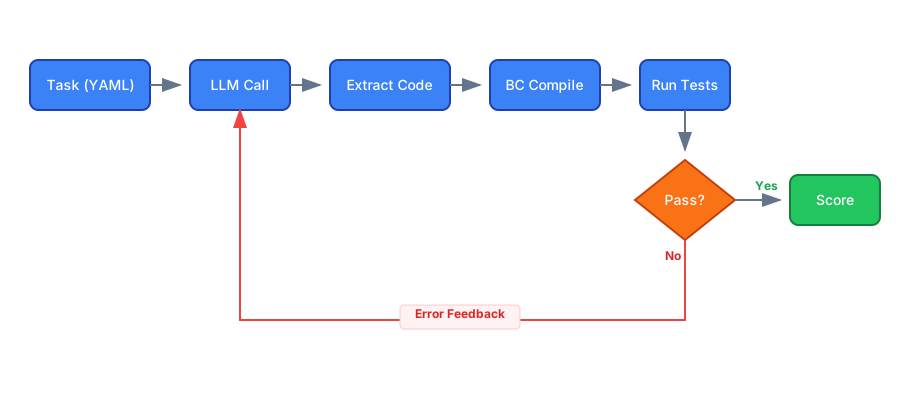
Once I removed my test code and let BC handle the responses properly, it actually worked. The web client isn’t functional yet, but that wasn’t the main goal. The core is there: compile extensions, publish apps, run tests. That’s what I was after. Heck, a Hello World which showed the code ran on Linux was enough for me at that point.
Directions EMEA 2025 Presentation
Last year, before Directions EMEA, Stefan Maron reached out. He had heard about my Wine experiments and wanted to collaborate on a presentation. We teamed up and put together a talk showing the journey, the technical details, and a live demo. Well, we skipped the live demo part since doing live demos of experimental software is a recipe for disaster.
Once I had something functional, Stefan and I measured it properly. Same test app, same pipeline, Windows versus Linux.
The first working build: Linux finished in 13.4 minutes versus 18.4 minutes on Windows. That’s 27% faster out of the gate. Not bad, not bad at all.
After optimisation (smaller base image, certain folders in RAM, no disk cleanup overhead), Linux dropped to 6.3 minutes. Windows stayed around 18 minutes. 65% faster. But all this was on GitHub’s hosted runners, what if we could optimize further?
With caching on a self-hosted runner: 2 minutes 39 seconds total. At that point, we’d shifted the bottleneck from infrastructure to BC itself. Just pure service startup time, waiting for metadata to load was the limiting factor.
The container setup phase showed the biggest difference. Wine plus our minimal Linux image pulled and started in about 5 minutes. The Windows container took nearly 16 minutes for the same operation.
What Didn’t Work
The web client doesn’t work yet. I haven’t put much effort into it since it wasn’t the main goal. Last time I tried I had the web server running, but the NST and the web service just wouldnt talk to each other. Stopped there as Directions was coming up and I wanted to focus on the service tier.
The management endpoints don’t function. We had to write custom AL code to run tests via OData instead.
Some extensions that use uncommon .NET APIs crash immediately. If your extension does something exotic with Windows interop, it won’t work here.
What’s Next
This was always a proof of concept. The goal was to answer “can it be done?” and the answer is yes, with caveats.
Big disclaimer: This is purely a “see if I could” project. It’s not ready for production use, and I wouldn’t even recommend it for automated testing pipelines in its current state. It’s an experiment.
The code is up on GitHub.
Mine
BC4Ubuntu is my first try. Don’t use it, as it is messy and unoptimized.
wine64-bc4ubuntu has the custom Wine build.
Stefans
BCOnLinuxBase is the optimised base image.
BCDevOnLinux is the actual Dockerfile for BC. This is the one to use. But be careful, with great power comes great responsibility.
I’ve also got the NST running on ARM hardware. Getting SQL Server to work on ARM is an entirely different project for another time.
Would I run production on this? Absolutely not. But that was never the point.
Sometimes you learn the most by doing things the “wrong” way. But it was a fun ride.
And can you keep a secret? More than 98% of the code was written by AI. If I had done it today, the last 2% would have been included as well.
Stefan Maron contributed significantly to the pipeline work. This was very much a joint effort.